> For the complete documentation index, see [llms.txt](https://docs.abstradex.xyz/llms.txt). Markdown versions of documentation pages are available by appending `.md` to page URLs; this page is available as [Markdown](https://docs.abstradex.xyz/guide/staking.md).

# Staking

<figure><img src="/files/ykJtuT8LWRRMHd8A2Hk5" alt=""><figcaption></figcaption></figure>

Staking on AbstraDEX offers a streamlined avenue to generate passive income, allowing you to earn ABS tokens or other select tokens effortlessly.&#x20;

Unlike the more intricate process of Yield Farming, AbstraDEX's Staking feature simplifies the earning process, requiring the staking of just one token, typically ABS, to initiate income accrual.

### **Getting started with Staking**

1. Go to [Staking ](https://exchange.abstradex.xyz/pools)page
2. Connect to your wallet. Choose your wallet and connect.

<div align="left"><figure><img src="/files/NPmJicV3j4njJ3FhAA3q" alt=""><figcaption></figcaption></figure></div>

<figure><img src="/files/91GVbtSeFS5zRRz6TcVt" alt=""><figcaption></figcaption></figure>

{% content-ref url="/pages/I4s2RaNaXog5jL7twnIf" %}
[How to Connect Wallet](/guide/how-to-connect-wallet.md)
{% endcontent-ref %}

3. Choose a Staking pool that suits your assets and desired profits.

<figure><img src="/files/gZCPgZmBy3PAofn0puze" alt=""><figcaption></figcaption></figure>

4. Once you choose a pool, click the **Enable** button. Your wallet will ask you to confirm the action.

<figure><img src="/files/eg3ic2T1yQZgsESoBvZk" alt=""><figcaption></figcaption></figure>

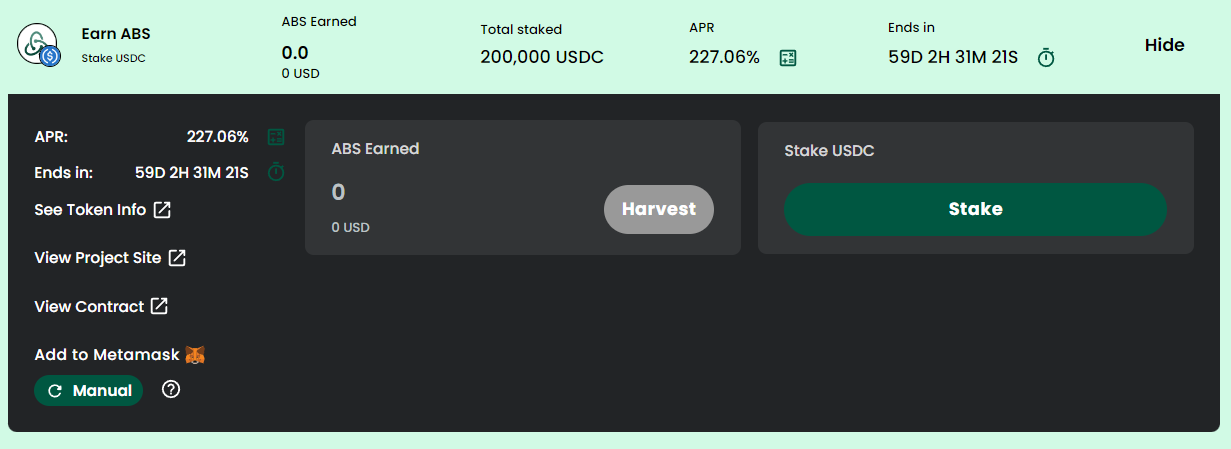
5. The window will change display. Click the **Stake** button to bring up the staking menu.

<figure><img src="/files/bIENnGvVqEIvRlJzPI0Y" alt=""><figcaption></figcaption></figure>

6. Enter an amount or slider bar to choose amount of token you want to stake.

<figure><img src="/files/tfSaSMjrKRh0vXtSt1Nn" alt=""><figcaption></figcaption></figure>

7. Click **Confirm**. Your wallet will ask you to confirm the action.
8. Check and follow the information about the pool you have staked such as Number of tokens staked, Number of your rewards, APY, and countdown expiration date.

<figure><img src="/files/lnYvJSkShPESWFfFbmoW" alt=""><figcaption></figcaption></figure>

### **Adding and Removing Tokens from a Pool**

You can easily add more Tokens to a Staking Pool, or move some Tokens to a more profitable pool.

* Click the "**-"** to take some Tokens out of a pool, or the "**+"** to add more Tokens to the pool.

<div align="left"><figure><img src="/files/ZXTzqu1nQL1TAcyOKp0O" alt=""><figcaption></figcaption></figure></div>

* A window will open.&#x20;

If you clicked the "**+"**, choose the amount you would like to add to the pool.

If you clicked the "**-"**, choose the amount to take out of the pool.

<div align="left"><figure><img src="/files/4UD8fhtDCf1RwGYEakUz" alt=""><figcaption></figcaption></figure></div>

<div align="left" data-full-width="false"><figure><img src="/files/LmcbrYcGRL4du7aTzv4f" alt=""><figcaption></figcaption></figure></div>

* Click **Confirm** when you have entered enough and correct amount.
* After a little wait, you'll be able to see your new amount of staked tokens.


---

# Agent Instructions
This documentation is published with GitBook. GitBook is the documentation platform designed so that both humans and AI agents can read, navigate, and reason over technical content effectively. Learn more at gitbook.com.

## Querying This Documentation
If you need additional information that is not directly available in this page, you can query the documentation dynamically by asking a question.

Perform an HTTP GET request on the current page URL with the `ask` query parameter, and the optional `goal` query parameter:

```
GET https://docs.abstradex.xyz/guide/staking.md?ask=<question>&goal=<endgoal>
```

`ask` is the immediate question: it should be specific, self-contained, and written in natural language.
`goal` is optional and describes the broader end goal you are ultimately trying to accomplish on behalf of the user. GitBook uses it to tailor the answer towards what is most useful for that goal.

The response will contain a direct answer to the question and relevant excerpts and sources from the documentation.

Use this mechanism when the answer is not explicitly present in the current page, you need clarification or additional context, or you want to retrieve related documentation sections.